
AutoRig
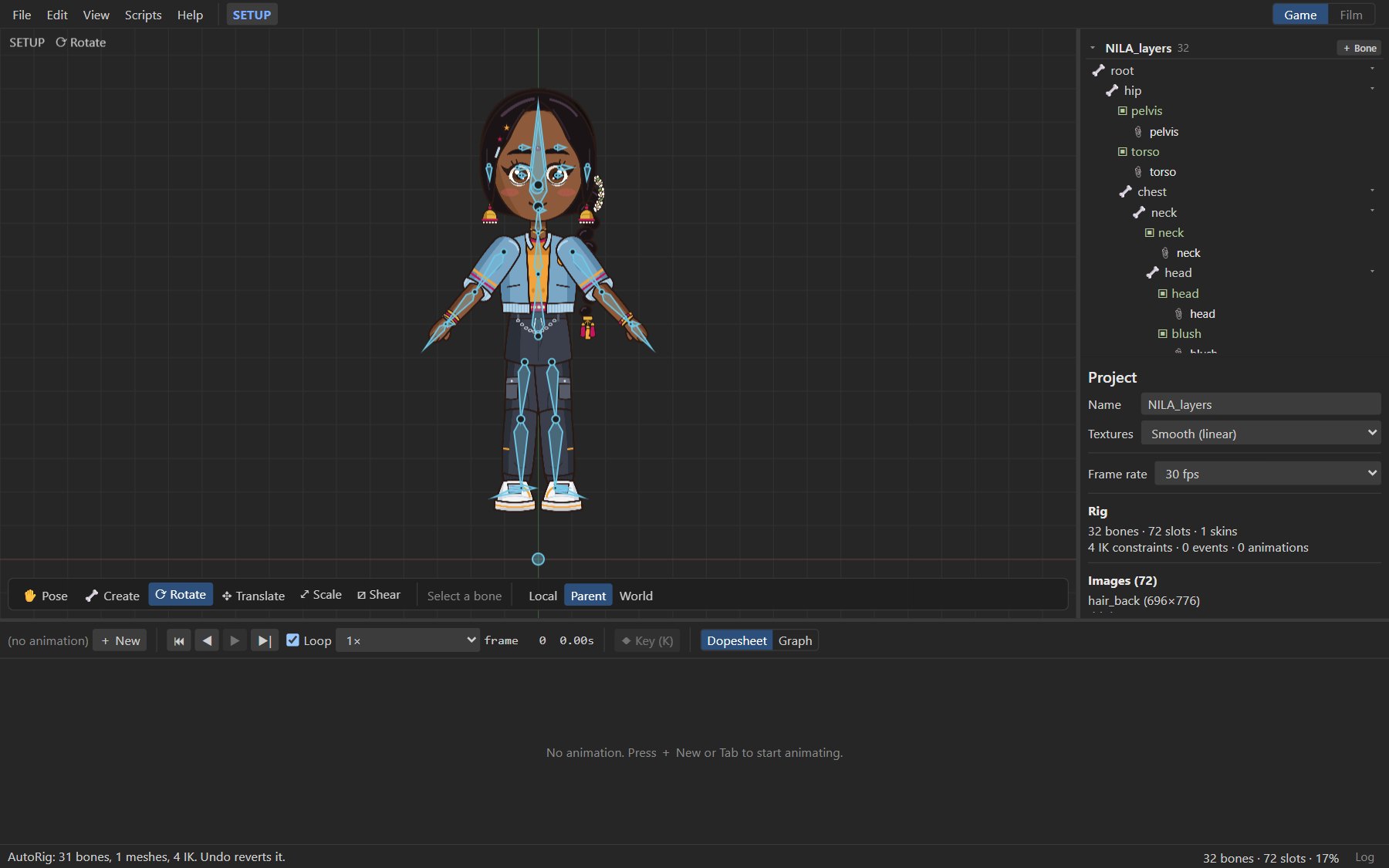
AutoRig turns layered artwork into an editable rig in one step: it identifies the body parts, places joints where the parts meet, builds the skeleton, turns bending parts into weighted meshes and adds IK to arms and legs.
#Rigging a character
- Start from a project with the layers imported and no bones yet: File ▸ Import PSD…, or the Import PSD… button inside the AutoRig dialog. See Importing art.
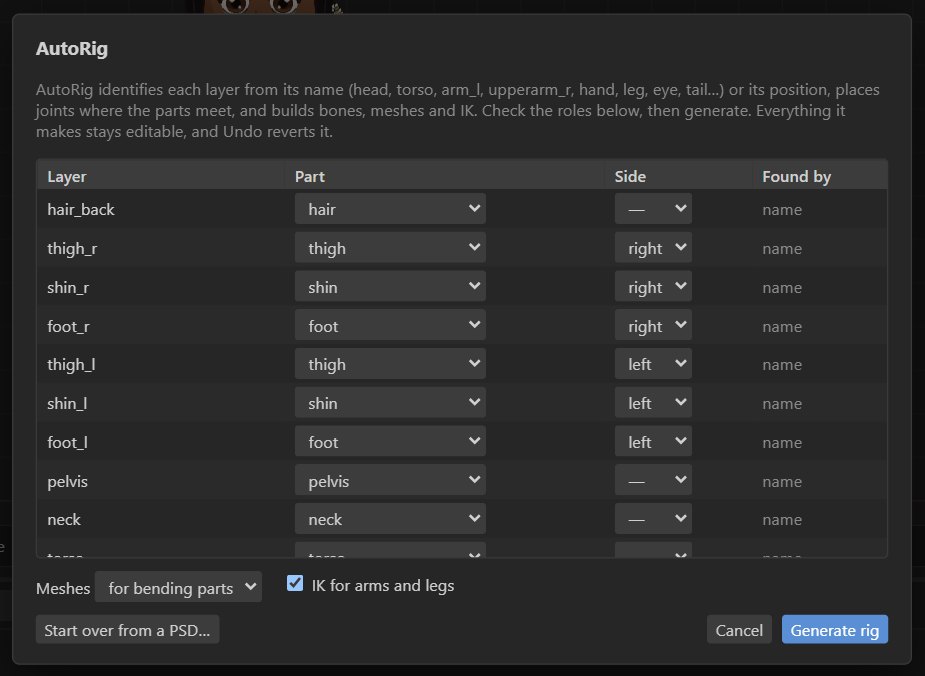
- Choose File ▸ AutoRig artwork…. The table lists every layer with the Part and Side AutoRig found for it, and whether it was found by the layer's name or its position.
- Correct any row that is wrong, or choose — leave unrigged — for layers that should not move (a background, a shadow you will place by hand).
- Press Generate rig. It is one undo step.
Note
AutoRig works on unrigged artwork. If the project already has bones, the dialog says so and offers Start over from a PSD…, which opens a fresh project for the artwork.
#What it builds
- Spine: a
hipbone low in the body and achestbone up to the shoulders. The body layer becomes a mesh that bends with both. - Neck and head: the head turns at its base.
- Arms and legs:
upperarm,forearm,hand,thigh,shinandfootbones, with joints where the layers meet.- A single layer for a whole arm or leg is split into two bones and turned into a weighted mesh, so it bends at the elbow or knee.
- IK targets (
ik_hand_l,ik_foot_r, …) are added for two-bone limbs. A limb drawn bent keeps its bend direction; a straight one bends its middle joint away from the body. Flip Bend in the IK settings to reverse it.
- Face: small bones for the eyes, pupils (following their eye), brows, nose, mouth and jaw, under the head.
- Extras: hair and ears hang from the head, wings from the chest, and tails from the hip as a three-bone chain with a mesh.
- Anything else rides on the nearest bone, and the log lists it.
Every layer stays exactly where it was drawn, and everything AutoRig makes is ordinary rig data: rename bones, move joints, repaint weights, add constraints.
#Naming layers
Names are read loosely: case, separators and word order do not matter. L_UpperArm,
upper arm left, arm.l and LeftArm2 are all understood.
| Part | Names that work |
|---|---|
| Torso | torso, body, chest, trunk, belly, shirt, jacket, dress |
| Pelvis | pelvis, hip(s), waist, pants, shorts, skirt, belt |
| Head and neck | head, face, skull; neck |
| Arms | upperarm / upper arm / shoulder / sleeve; forearm / lower arm / elbow; hand, fist, glove, fingers, claw; or arm for a whole arm |
| Legs | thigh / upper leg; shin / calf / lower leg / knee; foot, shoe, boot, paw; or leg for a whole leg |
| Face | eye, pupil / iris, brow / eyebrow, mouth / lips / teeth, nose, jaw / chin, ear |
| Extras | hair, bangs, ponytail, hat, helmet, horns; tail; wing |
Sides: l, left, r or right, anywhere in the name. Sides are the character's. When a
layer has no side, AutoRig assumes the character faces you, so its left is on the image's right.
Alternate images of a part, such as hand_open and hand_fist or mouth_A and mouth_O,
share the part's bone, and their slot gets each alternate as an attachment.
Tip
Layers named for nothing in particular (Layer 12) are identified by where they sit. Naming them
is still faster than fixing rows in the table.
#After AutoRig
- Check the joints by rotating bones with the Rotate tool, and move any joint that is off: in Setup mode, translate the bone (its children and images stay where they are drawn).
- Repaint mesh weights where a bend looks soft or stiff. See Meshes.
- Add physics to hair, earrings and cloth.
- Save poses for expressions, and set up lip-sync.
#Through MCP
| Tool | What it does |
|---|---|
detect_parts | Previews AutoRig on a PSD or an unrigged .rigby file. |
autorig | Rigs a PSD into a new .rigby file, or rigs an unrigged one. |
See the MCP guide and Retargeting for reusing animations between characters.