
Lip-sync
Rigby2D makes a character talk from an audio file. Viseme lip-sync keys a mouth slot shape by shape from the speech, timed by automatic transcription on your computer, a typed line, or a timing file from another tool. Loudness lip-sync opens and closes a mouth control with the volume.
#What you need
- An audio track on the animation: File ▸ Import audio… in the Film workspace (WAV, MP3, OGG, M4A or FLAC). See Audio.
- A mouth slot with an image per mouth shape (it can be fewer; see below). Name them after the
shapes (
mouth_A,mouth_MBP, …) and they are matched for you.
#The nine mouth shapes
Rigby2D uses the nine shapes animators use:
| Shape | For |
|---|---|
| A | ah, as in "father" |
| E | eh, as in "bed" |
| I | ee, and most consonants (C D G K N R S T Y Z) |
| O | oh, as in "go" |
| U | oo and w, as in "you" |
| MBP | lips closed: M, B, P |
| FV | lower lip on teeth: F, V |
| L | tongue up: L, TH |
| rest | silence between words |
#Generating lip-sync
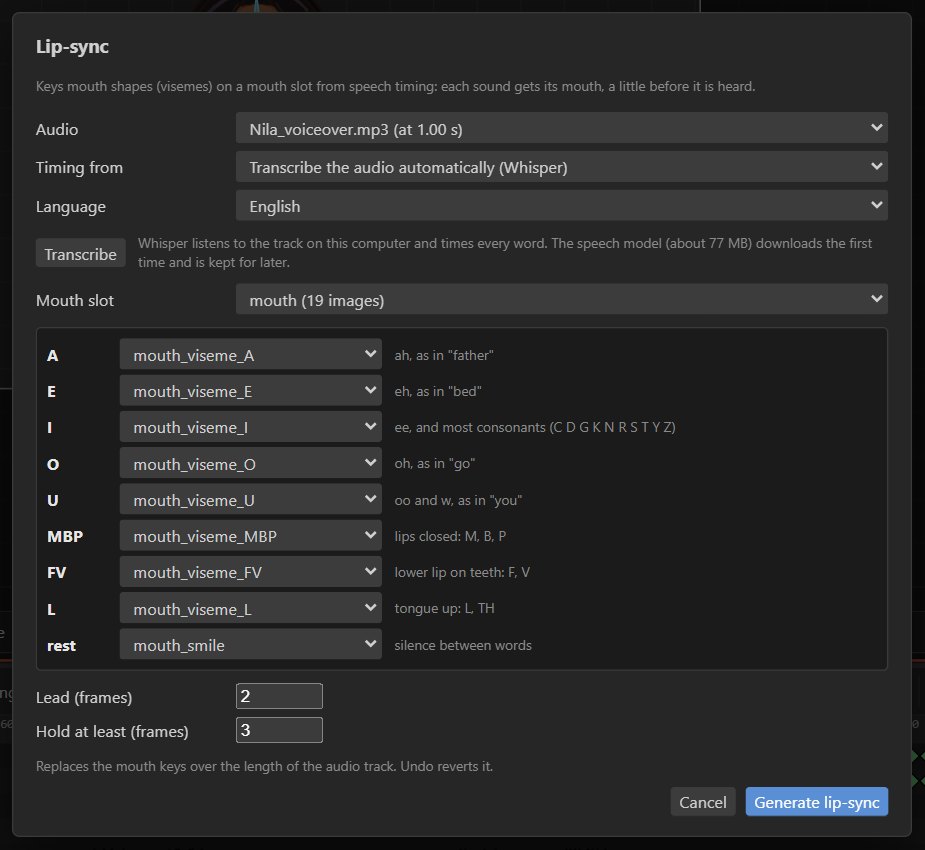
Select nothing to see the project panel, and press Lip-sync… in the audio section. In the dialog:
- Audio: the track to sync (with its start time).
- Timing from: where the timing of the words comes from (see Timing sources).
- Mouth slot: the slot whose images cover the most shapes is chosen for you.
- Check the mapping of each shape to an image (see Mouth images).
- Lead (frames) and Hold at least (frames): see Timing.
- Press Generate lip-sync.
It replaces the mouth keys over the length of the track as one undo step. The result is ordinary
image-swap keys, so it exports to skeleton JSON and .skel, plays in every runtime and renders with
the audio.
#Timing sources
#Automatic transcription (default)
Whisper, a speech recognition model, listens to the track on your computer and times every word. You need neither a transcript nor a timing file.
- Pick the Language spoken (English by default; Tamil, Hindi, Telugu, Malayalam, Kannada, Spanish, French, German, Italian, Portuguese, Russian, Japanese, Korean, Chinese and Arabic are listed).
- Transcribe shows what it heard, so you can check it. Generate lip-sync transcribes first if you have not.
- The speech model (about 77 MB) downloads from Hugging Face the first time and is kept by the browser or app, so later runs work offline. Your audio is never uploaded.
- A minute of speech takes well under a minute on a desktop PC.
#The words spoken
Type the line that is said. Rigby2D lays the words over the speech in the track by its loudness, giving each word time for its sounds. Good when you have the script and the recording is clean.
#A timing file
For exact timing from another tool, choose Choose timing file…:
| Source | Files |
|---|---|
| ElevenLabs text-to-speech | The timestamps JSON (character timings, so a generated voice syncs exactly). |
| Whisper and other speech tools | Word-timing JSON: OpenAI Whisper's segments[].words, transformers.js chunks, or any [{ "word", "start", "end" }]. |
| Rhubarb Lip Sync | .tsv or .json output (mouth cues). |
| Papagayo / Moho | Switch files (.dat). |
#Mouth images
Images are matched to shapes by name: mouth_viseme_A, A, ah, MBP, mouth_FV, and
mouth_smile or rest for the rest mouth are all understood. Set any shape by hand in the mapping
table. A shape without an image uses the rest mouth, so you can start with three or four mouths (rest,
A, O, MBP) and add more later.
Tip
Draw MBP (lips closed) and a wide open A first: they carry most of the sync. FV and L add polish in close-ups.
#Timing
- Lead (frames): each mouth lands this many frames before its sound (2 by default), because a mouth that moves exactly with the sound looks late.
- Hold at least (frames): a shape stays at least this long, so the mouth never flickers on fast speech.
#Loudness lip-sync
For a mouth drawn as one shape that opens and closes, use a face control: its Lip-sync button keys the control on every frame from the loudness of the animation's first audio track. The mouth opens on speech and closes in silence.
#Through MCP
lip_sync does both kinds: viseme lip-sync from text or a timing_file onto a slot (with
mouths, lead and min_hold), or loudness lip-sync onto a face control. See the
MCP tools.